ROBOT SOFTWARE

ROBOT SOFTWAREROBOT SOFTWAREROBOT SOFTWARE
Home
ABOUT

ROBOT SOFTWARE

ROBOT SOFTWAREROBOT SOFTWAREROBOT SOFTWARE
Home
ABOUT
More
  • Home
  • ABOUT
  • Home
  • ABOUT

Connecting KLANG to your Midi Hardware.

FIRST THINGS FIRST.


To get started with KLANG, you need it connected to your Modular Systems, Semi-Modulars and your MIDI synths. KLANG works with MIDI, so this is kind of needed to do anything.


With KLANG, you use a couple of Panels - one panel to define which devices KLANG will work with, and another panel which has a list of connected MIDI Ports.


So, that's MIDI Ports and letting KLANG know which MIDI Port is for what. You will use a panel to add and define the DEVICES that KLANG can work with, and assign it a MIDI Port. And some useful buttons for checking they are connected. Oh, and a SHUT UP button so make your devices go silent. 
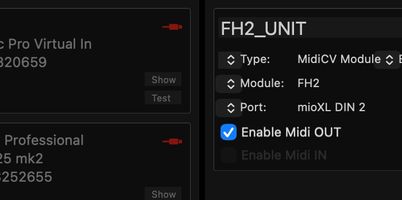

Screenshot showing MIDI device settings with FH2_UNIT enabled for MIDI OUT.

Downloads

KLANG_Midi_Device_IMAGE (png)Download
KLANG_MIDI_Device_Setup_Guide (pdf)Download

Connecting Klang to an Expert Sleepers FH2. How to connecting KLANG to your Eurorack via a Midi to CV Modules.

Connecting KLANG to Midi Synths

Klang + Managing your Mid CV Modules.

The 'Manage Midi Setup' in KLANG.

CVs and FH2s - and the SHUT UP button.

Connecting KLANG to a larger number of module CVs.

Patching to Semi-Modular : Black Corporation VOICE & BREAKOUT

Copyright © 2026 robotsoftware - All Rights Reserved.

..

This website uses cookies.

We use cookies to analyze website traffic and optimize your website experience. By accepting our use of cookies, your data will be aggregated with all other user data.

DeclineAccept